Quick answer: streaming is allowed, but name the game correctly
The official MECCHA CHAMELEON Steam Community notice permits gameplay videos, livestreams and other public video posts. It says creators do not need to contact the developer before or after publishing. That makes the game accessible to first-time creators, established channels and organization-affiliated streamers, provided the published conditions are followed.
The easiest condition to miss is the title requirement. Include either “MECCHA CHAMELEON” or the Japanese name “めっちゃカメレオン” in the stream or video title. Do not rely only on a description, hashtag or shortened nickname. A viewer should be able to identify the game from the listing page before opening the video.
This article is a readable summary, not a replacement for the official notice. Recheck Steam Community before a sponsored broadcast, commercial campaign, permanent archive, clip channel or unusual reuse of game assets, because the developer may update the terms.
Put the official game name in the title, publish on a platform named by the notice, monetize only through official platform programs, and clear every third-party song, image, mod, voice and participant identity separately.
Four practical rules from the official notice
The Steam Community post published on June 5, 2026 can be translated into four production decisions.
Use the game name in the title
Include MECCHA CHAMELEON or めっちゃカメレオン in every livestream or uploaded-video title. A series name may come first, but the official title should remain visible.
Use a listed publishing platform
The notice names YouTube, Twitch, TikTok and X. If you repost elsewhere, verify that service's rules and check whether the developer changed the approved list.
Use platform-native monetization
Official partner features such as YouTube Partner Program or Twitch Affiliate and Partner monetization are allowed. That does not grant permission to sell extracted assets or redistributed game files.
Clear third-party rights separately
Permission to show the game does not automatically license music, fan art, mods, sponsor graphics, voice chat, usernames or another creator's footage.
YouTube, Twitch, TikTok and X
Feature names differ by platform, but the safe pattern is consistent: identify the game, use normal publishing and revenue tools, and avoid implying that your channel is official.
| Use | Status | What to verify |
|---|---|---|
| YouTube live and uploads | Allowed | Use the official name in the title. Ads, memberships and Super Chat should run through YouTube's own systems. |
| Twitch | Allowed | Choose the correct category and title. Receive subscriptions and Bits through official Affiliate or Partner tools. |
| TikTok | Allowed | Keep the game name readable even in short titles and avoid clips edited to create a false claim. |
| X | Allowed | Identify the game in the post or video title and do not style an independent account as developer-operated. |
| Clips and archives | Review the same conditions | Check participant consent, chat visibility, music, sponsor disclosure and the destination platform's clipping policy. |
What monetization is allowed?
The official notice allows revenue earned through partner programs offered by the publishing platform. Typical examples include advertising, subscriptions and viewer-support features managed by YouTube or Twitch. This permission concerns publication of gameplay; it is not a license to resell screenshots, upload game files, package artwork or create a paid asset library.
Sponsored broadcasts need more caution than ordinary platform monetization. The notice restricts content that contains paid promotion beyond fees provided by the platform. If a brand pays for product placement, a campaign message, a logo overlay or a dedicated segment, obtain specific permission before publishing.
Viewer matches add privacy and moderation responsibilities. Participant voices, account names, chat messages and friend codes may be recorded. Explain the recording, archive and clipping scope before players join, and provide a way to leave if they do not consent.
- ✓ Official game name appears in the title
- ✓ Correct game category is selected
- ✓ Revenue uses only official platform tools
- ✓ Sponsors and paid promotion were checked separately
- ✓ Participants know the recording and clipping scope
- ✓ Music, images and mods have separate permission
A practical pre-stream workflow
Treat compliance as a short production process rather than a checkbox completed once.
Open the official notice
Check the latest Steam Community posts for changes to naming, platforms, monetization or prohibited uses.
Build the title and description
Place the official game name in the title. In the description, identify the stream as independent and disclose viewer rules, mods and added media.
Run a private technical test
Inspect gameplay capture, voice chat, desktop notifications, friend codes and account details before going live.
Publish viewer-match rules
Define spoilers, stream sniping, harassment, turn order, late joining, voice chat and clipping before the lobby opens.
Review the archive
Mute, trim or unpublish sections if a rights issue, personal detail or participant objection appears after the stream.
Information that may appear on stream
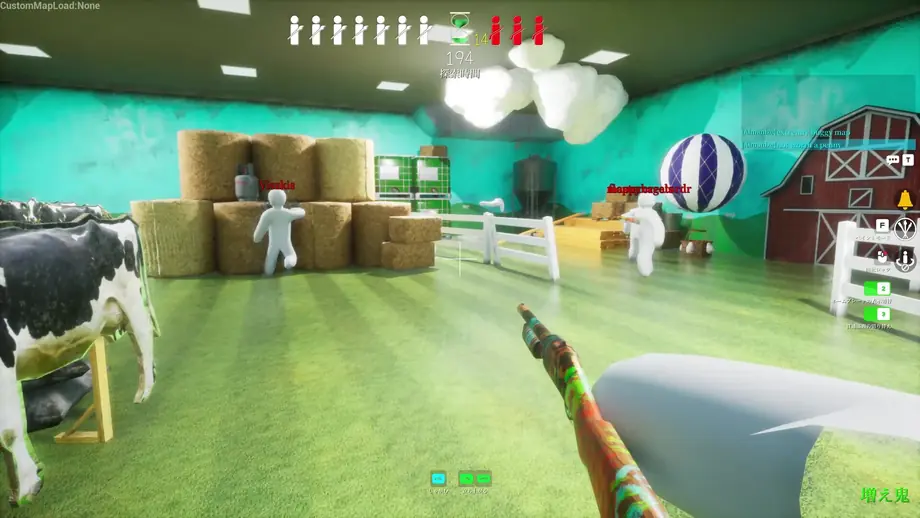
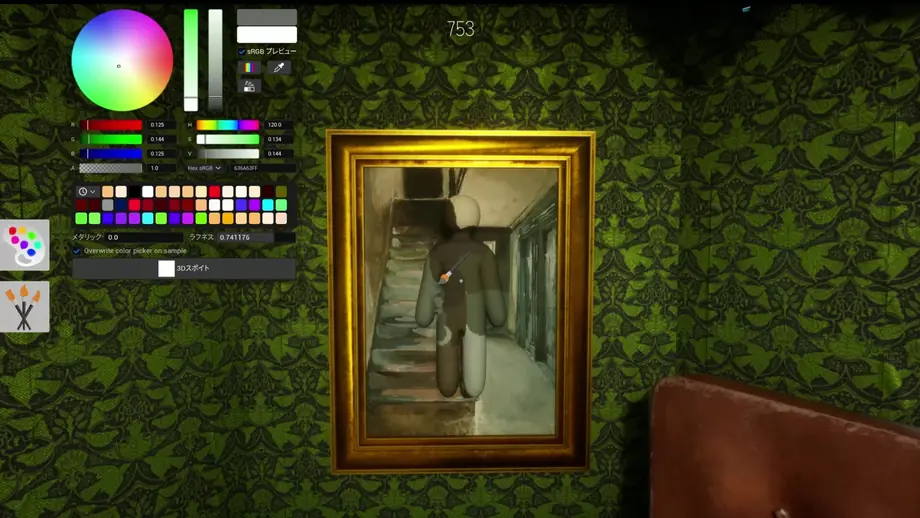
Wide stage views and close paint-matching scenes expose different information. These official Steam screenshots help you test overlays, names, chat and notifications before going live.
What permission to stream does not cover
A gameplay-publication policy is not unlimited permission for every asset or commercial use.
Presenting the channel as official
Do not use branding or wording that makes an independent stream look operated, approved or sponsored by the developer.
Treating sponsorship as normal ad revenue
Platform ad revenue and outside paid promotion are different. Ask for permission when a sponsor funds the content.
Adding unlicensed third-party media
Commercial music, community screenshots, mods, fan art and other creators' video remain controlled by their own rights holders.
Publishing participant information without consent
Voice, usernames, profiles, friend codes and chat can identify people. Explain and document the publication scope.
Guideline and version verification
On July 22, 2026, this wiki checked the official Steam news API and Steam Community. The latest listed game version was 3.0.0, published on July 20, 2026. The streaming terms are available in a Steam Community notice dated June 5, 2026.
This is a game wiki, not a download host. Buy and update the game through the official Steam store, and treat the newest developer notice as the controlling streaming policy.
MECCHA CHAMELEON streaming FAQ
Can I stream MECCHA CHAMELEON without asking first?
The official notice says advance or follow-up contact is not required. You still need to follow its title, platform, monetization and prohibited-use conditions.
Can a monetized YouTube channel stream the game?
Yes, when revenue comes through official platform features such as YouTube Partner Program. Outside sponsorship needs separate review.
Are Twitch subscriptions and Bits allowed?
Use Twitch's official Affiliate or Partner features and comply with Twitch's own rules.
What must appear in the stream title?
Include MECCHA CHAMELEON or めっちゃカメレオン in the title itself, not only in the description or tags.
Can I upload clips?
Apply the game rules plus participant permission, music rights, privacy checks and the destination platform's clipping policy.
What should I set before a viewer lobby?
Publish rules for recording, archives, clips, stream sniping, spoilers, harassment, voice chat, turn order and late joining.
Official sources
- MECCHA CHAMELEON Steam Community — Developer notices, including the June 5, 2026 terms post.
- MECCHA CHAMELEON Steam Store — Official store and developer/publisher reference.
- Steam News fix3.3.2 — Ultima versione verificata: 3.3.2 (30 luglio 2026)
Guides for stream setup
Multiplayer and viewer-match guide
Lobby setup, invitations, public rooms and viewer-participation rules.
Price, purchase and safe installation
Use official Steam sources and avoid unverified download claims.
Controls and keybind guide
Verify controls, input troubleshooting and controller settings before a broadcast.